📢 Disclosure: Some links on this page are affiliate links. As an Amazon Associate, I earn from qualifying purchases at no extra cost to you. Thanks for your support.
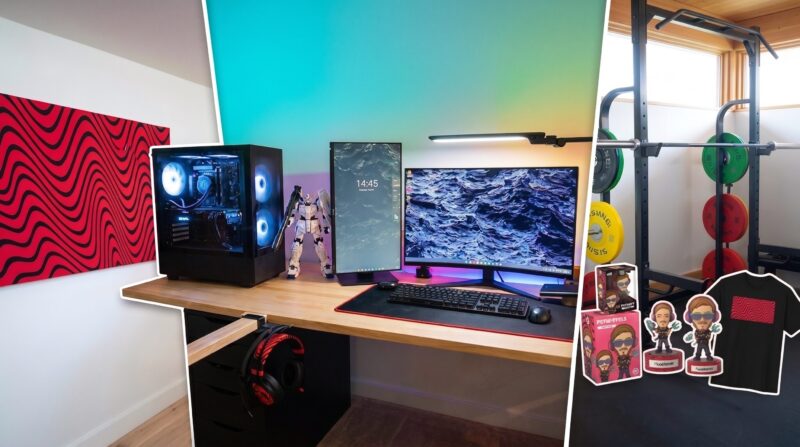
After years of wondering, PewDiePie finally showed off his setup in Japan, and it’s way more than just a place to scream at a screen. He calls it his space to buff his stats, and I guess that’s a pretty smart way to look at a workspace. It’s a bit of an odd layout because he’s got a full-on gym right next to his PC, but he’s all about using his space for stuff he actually does every day rather than keeping a guest room that stays empty 99% of the time. So, I get that. For those who don’t know, his real name is Felix, but most of the internet just knows him as the guy who’s been killing it on YouTube for ages.
Pewdiepie’s got over 110M subscribers, 4.6K videos, and over 29 billion views. He should know a thing or two about a good office setup so, I was excited to check out what he’s using. Originally from Sweden, but based on his channel, he’s currently residing in Japan. So, the setup may not be as expected. Let’s jump straight into our review.
Why PewDiePie is a top expert on gaming environments
PewDiePie isn’t just a guy who got lucky with a webcam; he’s a veteran who’s spent more time in front of a PC than arguably most people on the planet. He knows what makes a pro setup work because he’s spent time reacting to and critiquing how other big creators, like Pokimane or Minimiter, handle their gear and messy cables. The standards have to be set high, he even used a 3D program to plan out his room to make sure everything would fit the vibe before he started buying anything. You’d think that when he picks great, it would be backed by years of trial and error in one of the most demanding creative environments out there.
PewDiePie setup gear list: PC parts and peripheral used
- The Brains: He’s running a custom pre-built PC with 32GB of RAM and an Intel i9 processor.
- The Screens: He traded his old ultrawide for a main monitor and a side portrait-mode display, which he appears to be using for a Spotify playlists and staying organized.
- Audio Power: He’s got a pair of high-end Danish speakers that he says are the kind of gear you keep for life.
- The Inputs: He uses a Japanese layout keyboard and a wireless mouse to keep things clean.
- Cable Stealth: PewDiePie hates cables, he calls them the enemy, I understand why, so he’s got them tucked in boxes and hidden behind his speakers. The thought behind his cable management is impressive.
- Storage: Instead of a basic pegboard, he’s got a string board made of tree fiber plastic. A feature you don’t usually see, I have never heard of a string board before checking out his office setup.
- The Seat: He uses a black and white Clutch gaming chair that fits the room’s monochrome look. This is one of the main features of his setup, his chair and handles fit perfectly underneath the desk, which is essential if you want that clean office tucked away appearance when you’ve not using it.
- The Gym: There’s a half-power rack with a barbell and dumbbells for squats, benching, and deadlifts. Again, not the usual setup you’d see in a standard office, but I think the addition of a home gym is perfect for taking your mind off work and getting good exercise straight after doing some tasks.
- The Assistant: You can’t forget about the cozy little bed under the desk specifically for his dog, Maya.
To see how all that looks, check out the full video tour here:
I have to day, the most impressive feature to Pewdiepie’s office setup is his PC unit and monitor setup. At a time where most people are just going for ultrawides, the vertical monitor next to the widescreen display adds a level of optimization you can’t get with one standalone monitor. The PC, as expected, is a standout feature. The housing displayed with transparent glass and a top of the range cooling system looks very cool, combined with the neon lights.
Interestingly enough, he explains in the video that he didn’t have time to build his own computer, so he just got a custom prebuilt one. It’s got the intel I9 2.56Gh with 32GB or RAM, but he doesn’t actually say which GPU he is using. If anyone knows, please comment it below.
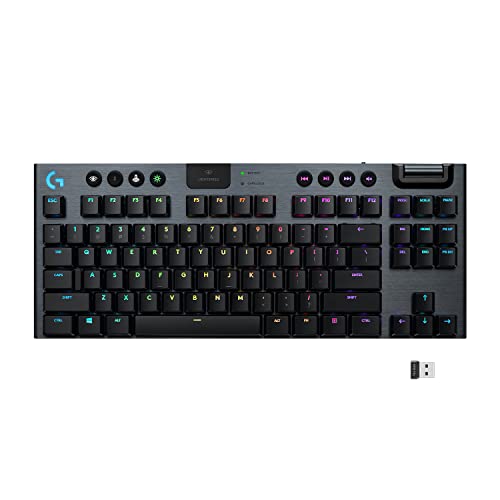
He also puts a lot of emphasis on his organization components and clean office look. He seems to be using a string board feature from the iconic Swedish brand String Furniture for holder placements. And he has multiple drawers and storage components under his desk. The keyboard and mouse are also wireless to go with the clean office look. Here’s the keyboard he’s using for this setup:
- • LIGHTSPEED Bluetooth Connectivity
- • 40-Hour Battery Life
- • Low Profile Mechanical Switches
This is the Logitech G915 TKL, it’s a high-performance gaming keyboard that features professional-grade LIGHTSPEED wireless technology and Bluetooth connectivity. Its thin, tenkeyless design is crafted from aircraft-grade aluminum alloy that give it a sleek aesthetic and long-lasting durability.
The keyboard has low-profile mechanical switches, such as the GL Tactile, to provide the speed and accuracy of a standard mechanical switch at half the height. It can run up to 40 hours of gameplay on a single charge, with a full recharge taking around three hours. I can see how is fits into Pewdiepie’s setup for being a long lasting wireless addition.
It also includes LIGHTSYNC RGB lighting for per-key customization and dedicated media controls, with a precision-engineered volume wheel for easy adjustments during play.
Inside PewDiePie’s gear strategy
PewDiePie’s choices were all about balancing a busy life with long-term quality. He went with a pre-built PC because moving to Japan was a logistical nightmare, and he needed a powerful rig that would just work without the hassle of a custom build right then. His Danish speakers were a “dream purchase” for someone who values clean design and top-tier sound. Everything else, from the wireless gear to the hidden power strips, was chosen to fight his biggest enemy: clutter.
Best budget PewDiePie setup alternatives
If you don’t have a massive budget or can’t get his specific setup equipment, you can still get a similar vibe with some alternative options:
- The PC: You don’t strictly need a top-of-the-line i9. An Intel i7 or AMD Ryzen 7 build with 32GB of RAM can handle gaming and editing just fine for a much lower price. That being said, we didn’t specify the GPU, so if you want a good mid-range option the 4060 RTX is a decent option for the price. 4070, 5070 RTX options provide more power with NVIDIA GeForce RTX 5090 (32GB GDDR7) being at the top of the range.
- The Speakers: Instead of luxury units, check out the Audioengine A5+ or Fluance Ai61. For even tighter budgets, the Edifier MR4 is a solid entry-level choice.
- The Side Monitor: Any 24-inch IPS monitor with a rotating stand might actually do the job as an extra side screen. The BenQ GW2485TC or Asus ProArt PA248QV are great, budget-friendly options.
- The Chair: If you want to skip the pricey gaming brands, the Sihoo M57 is a great option, and the Branch Ergonomic Chair is great for better back support and a cleaner look.
One of the coolest parts is that PewDiePie didn’t just make a gaming corner; he made a Hobby Zone out of his office setup. Before, he was stuck building his Gundam models on the floor, but now he’s got a dedicated spot to sit and focus on his custom builds. He’s also got his shelves stocked with classic books like the Iliad and the Odyssey, showing he’s buffing his intelligence stats along with his strength, even though this may just be for a creative backdrop.
It might be a bit cramped, and he can’t even open one of the doors all the way because of his speaker, but it turned out to be an awesome office setup for work, play, and exercise. For that reason, we had to add it to our top office setups.
Thanks for reading our review of Pewdiepie’s office setup. By the way, if you’re wanting to upgrade your workspace, you should definitely check out these futuristic workstations. And, if you’re on the lookout for a new laptop PC to go with your office, our Laptop Finder Quiz can quickly find some recommendations for you.

Combining a BSc in Computing and Business with a passion for digital productivity, Eamon A. has spent the last three years reviewing the latest tech innovations. From high-performance laptops to essential home office accessories, his in-depth comparisons focus on design and functionality, ensuring readers find the perfect tools for their setup.
Last update on 2026-06-28 / Affiliate links / Images from Amazon Product Advertising API