📢 Disclosure: Some links on this page are affiliate links. As an Amazon Associate, I earn from qualifying purchases at no extra cost to you. Thanks for your support.
If you’ve spent any time on Twitch or YouTube lately, you’ve probably noticed that IRL streaming is taking off. It’s pretty much gone from walking around a mall with a phone to broadcasting high-def footage from the middle of a desert. I think now is a wild time to be a creator, but there’s one piece of tech that’s basically acting as the secret sauce for everyone doing it at a high level. And that’s Starlink. In this article, we’re going to review how IRL streamers like IShowSpeed are using this tech, how it might benefit you, and check out some alternatives.
For years, the biggest nightmare for any streamer was what you might call the dead zone. You’d be having a great moment, the chat would be popping off, and then, all of a sudden, you hit a patch of road with no cell towers, and your stream dies. It’s frustrating for the viewer and a total vibe-killer for the creator. For IRL steamers, this can be quite a common issue. But ever since SpaceX started filling the sky with their satellites, the game has now changed. They basically allow coverage from places that were previously unheard of.

![Starlink Mini Router - High-Performance WiFi Extender for Mesh Network | Starlink Router Mini [OEM] | New in Box](https://m.media-amazon.com/images/I/31dV06vfKfL._SL160_.jpg)

Why everyone’s obsessed with Starlink
The main reason Starlink is such a massive deal for streamers is that it doesn’t care about ground infrastructure. Most of us are used to cell data, which is great until the network gets busy. If you’ve ever tried to use your phone at a music festival or a big sports game, you might have noticed that when thousands of people are all trying to post to socials at once, the network can lag extensively.
Starlink is different because it’s an independent, space-based route for your data. It’s got low latency, which is usually between 25ms and 50ms, plus it’s fast enough for the real-time interaction that makes IRL streaming actually fun. Older satellite internet was famous for having a delay that felt like forever (we’re talking 600ms or more), making it near impossible to talk to a live chat. But with Starlink, you’re getting much better speeds from a dish you can throw in a backpack.
How Speed covered Africa with Starlink
In IShowSpeed’s recent tour through Africa, he spent 28 days hitting 20 different countries, from the streets of Zimbabwe to the inside of the Great Pyramid in Egypt. Travelling through rural parts of this continent can make finding a stable 50Mbps upload speed seem out of reach.
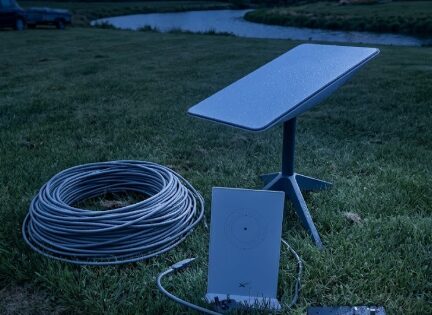
Speed’s team wasn’t just crossing their fingers and hoping for the best. They actually used a hybrid setup that combined local SIM cards with a Starlink dish acting as the backbone. On his stream, you could often see a flat, silver panel sitting nearby. That’s the Starlink Standard dish.
The genius move here is something called bonding. Professionals use software like Speedify or hardware encoders like the TVU One to mash Starlink’s satellite data together with 4G or 5G cell signals. So, if the Starlink dish briefly loses its handshake with a satellite as it moves across the sky, the cellular data kicks in for a split second to keep the stream from dropping. It’s how he and many other IRL streamers manage to stay live for hours while moving through places where traditional internet might not be available.
How other streamers use it
Other streamers are getting really creative with how they use this tech for their streams. For instance, Jakenbake has used mobile apps like TVU Go to stream while e-biking through Los Angeles, hitting spots like Venice Beach without dropping a frame even when switching between devices mid-stream. You’ll also see people like doodybeardIRL who’ve built their own DIY IRL backpacks using the Starlink Mini and the DJI Osmo Pocket 3 to stream high-def footage from crowded places like Disneyland. It’s actually a nice little setup you can take with you in a bag, and it lets them stay live in theme parks or comic book stores where regular cell signal usually has a hard time.
Other creators are pushing the boundaries even further by taking these rigs into the deep wilderness or onto moving vehicles. Some streamers have experimented with mounting Starlink terminals to ATVs or snowmobiles to film races in the middle of forests where cell towers don’t exist, though it’s a massive challenge to keep the dish aligned while bouncing around.
You’ve also got tech-focused creators like UFDTech using these satellite and bonding combos for charity drives across the country to make sure they can keep talking to their chat even on lonely stretches of highway. But whether they’re using high-end gear like a LiveU Solo or a cheaper DIY setup, the goal for these streamers is always the same, to keep up time for their viewers no matter how remote they go.
Is a SIM router like the Uplink a better deal?
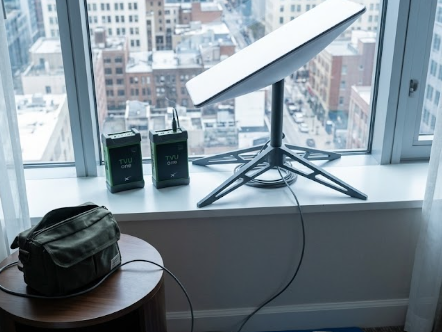
Now, you don’t always need a pricy satellite dish to get the job done. A lot of people use simpler setups, like a dedicated SIM card router, something like the Uplink mobile hotspots. I’ve had an Uplink modem hotspot for quite a few years, and for it’s propose, I think it’s a total bargain if you’re looking for affordable data on the go. I was able to find an unlimited data SIM deal for around $25 a month, which I thought was an amazing deal, especially if you compare it to Starlink’s heafty monthly fees.
For the most part, the internet on a router like the Uplink is pretty steady, but it’s not going to be amazing. Since you’re relying on a single SIM card, that one connection has to handle everything. I’ve noticed that as soon as you start connecting multiple devices, like your phone, a laptop, and a streaming camera, the speed can start to lag. I still think it’s a great budget option for casual use, but it’s exactly why guys like Speed use the TVU One to bond 18 cards together. When you’re trying to push a high-quality stream while also checking chat on a different device, that single-SIM bottleneck can be detrimental.
Standard vs. Mini: Which one should you get?
Right now, the choice for streamers usually comes down to the two models, which are the Starlink Standard and the Starlink Mini.
The Standard dish is the one you’ll see most base camp streamers using. It’s got a bigger surface area, which generally means it’s more robust and can handle high-demand tasks like 1080p60 streaming with fewer hiccups. It’s built to endure extreme weather, so if you experience more unpredictable weather in the middle of your broadcast, the Standard dish is probably going to keep jogging along. But the downside is that it can feel like overwhelming to take around. You’ll need a vehicle or a dedicated mounting tripod to move it around, and it pulls more power, so you’ll need a decent battery bank to keep it alive.
Then there’s the Starlink Mini, which has become the more travel-friendly solution for the IRL community lately. It’s about a third of the weight of the Standard model and small enough to slide into a backpack or a saddlebag. It actually has the Wi-Fi router built right into the dish itself, so you don’t have to carry a separate box. It’s also incredibly power-efficient, drawing only about 20 to 40 watts. So, it’s said you could potentially run this thing off a 100W USB-C power bank. While the upload speeds might be slightly lower than the Standard model, topping out around 11.5Mbps, it’s still plenty fast for a high-quality mobile stream.
Getting it up and running
Setting this stuff up isn’t as scary as it might look. As long as you can find a spot where you aren’t under a massive tree. Here are some tips on getting the TVU One up and running.
- Clear sky is everything: The Starlink app has this cool alignment tool that uses your phone’s camera to scan the sky. It’ll tell you if there are any obstructions, like buildings or branches, that are going to block your signal.
- Set the kickstand and go: Both the Mini and the Standard (v4) models come with a built-in kickstand. You just flip it out, set it on the ground or a flat roof, and let it do its thing.
- The app does most of it: Once you plug it in, you just open the app and follow the prompts. The dish is an electronic phased array, which is a fancy way of saying it can find and track satellites without actually moving its physical body once it’s aligned.
- Bond it if you can: If you want even more stability, use an Ethernet adapter (for the Standard) or the built-in Wi-Fi (for the Mini) to feed the internet into a bonding app like Speedify. This lets you use your phone’s data as a backup so you’re never truly offline.
What else is out there?
While Starlink is definitely the popular and convenient choice right now, with over 9,000 satellites in orbit, there are also a few others in the game you may want to check out.
The biggest new competitor we’ve noticed is Amazon’s Project Kuiper (sometimes called Amazon Leo). It just started rolling out commercial service in early 2026, and its terminals are expected to be even cheaper, hopefully. Since it’s backed by Amazon and AWS, the integration for streamers could end up being really smooth once it’s fully live.
There’s also OneWeb, which is more for enterprise-level stuff, and legacy providers like Viasat and HughesNet. To be real, though, those last two aren’t great for streaming. Their satellites sit way higher up in geostationary orbit, which means your data has a much longer trip to make. You end up with latencies of 600ms or more, which can make interacting with your chat feel impossibly difficult.
Are there any downsides to a Starlink router for IRL streaming?
While having a setup like this can make you feel like a pro, it’s not all sunshine and rainbows, and there are some real-world downsides to watch out for. First off, these kits are expensive, and even though a Starlink terminal is technically tied to your account and useless once it’s reported stolen, it still can be at risk if it’s left out in the open.
Then you’ve got the privacy side of things, where the service is constantly collecting your location data, device metrics, and IP addresses, which can be a bit of a red flag if you’re trying to keep a low profile. Plus, if you’re using the standard Starlink router, you don’t have much control over security features like port forwarding or blocking harmful sites, which could leave your network open to trouble. Technical fails can also be a headache since things like heavy tree cover, buildings, or even just a crowded city can cause your signal to tank or your data to spike unexpectedly.
Should you get one
If you want to do what IShowSpeed does and stream from the streets of a country halfway across the world, Starlink is pretty much the way to go right now. It’s turned the whole planet into a potential streaming studio. And, whether you’re grabbing a Mini to keep in your backpack or setting up a Standard dish on your van, the dead zone is officially a thing of the past. Just make sure you’ve got a clear view of the sky and a solid power bank, and you’re good to go. The future of IRL streaming is no longer tethered to a cell tower, so it will be exciting to see what happens next in this space.
Thanks for reading our article on the Starlink Router for IRL live streamers. We hope this helped. Make sure to check out some of our similar, recommended articles below.

Combining a BSc in Computing and Business with a passion for digital productivity, Eamon A. has spent the last three years reviewing the latest tech innovations. From high-performance laptops to essential home office accessories, his in-depth comparisons focus on design and functionality, ensuring readers find the perfect tools for their setup.
Last update on 2026-06-28 / Affiliate links / Images from Amazon Product Advertising API