📢 Disclosure: Some links on this page are affiliate links. As an Amazon Associate, I earn from qualifying purchases at no extra cost to you. Thanks for your support.
If you’ve paid any attention to competitive Fortnite over the last few years, you definitely know who Shaun Cochrane is. Better known to millions of gamers as AussieAntics, he has solidified his spot as one of the internet’s premier esports analysts, commentators, and creators under the Dignitas banner. He has a pretty strong community regardless of whether he’s casting high-stakes FNCS tournaments or breaking down the craziest meta shifts; his massive community always seems to show support.
From what we’ve gathered, he seems to be most active on Twitch, but he still has an impressive empire across different platforms, with over 1.6 million followers on Twitch alongside a YouTube channel with 555k subscribers and a staggering 161,799,052 total views. With such a presence online, it only makes sense that a streamer of his level needs a solid setup. So, in this article, we’re taking an inside look at his PC and gaming setup to see what drives his daily broadcasts.
Let’s jump straight into his setup and check out what he uses:
- AussieAntics Monitor: Acer Predator 26.5 "A super fast 1440p gaming monitor that pairs amazing quantum dot OLED colors with elite responsiveness."
- The Broadcaster Standard: Shure SM7B Vocal Dynamic Microphone "The gold standard of dynamic broadcast microphones, legendary for providing warm, rich vocal quality while rejecting background noise."
- AussieAntics broadcasting mixer: TC Helicon GoXLR Online Broadcaster Platform "A comprehensive desktop audio control center featuring multi-channel hardware sliders and live voice tuning effects for premium streaming production."
- AussieAntics keyboard: HyperX Alloy Origins Core Tenkeyless Mechanical Keyboard "A rock-solid, ultra-durable compact keyboard featuring smooth linear switches, full aluminum housing, and brilliant per-key RGB backlighting."
- AussieAntics mouse pick: Razer DeathAdder V3 Pro Wireless Gaming Mouse "This small ergonomic mouse is great for quick movements due to its lightweight build and it still retains great wireless tracking and a 90-hour battery life."
The PC Specs & Performance Hardware
AussieAntics PC setup is similar to what we’ve reviewed from IShowSpeed and PewDiePie. He’s running a high-end processor with the 4090 GPU graphics card and 32GB of RAM. Which is plenty of power for his streaming tasks, so that his gaming and intense multi-match watch videos don’t have to compete for processing power:
- System Model: Dual Acer Predator Orion 7000 desktop rigs.
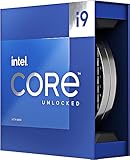
- Processor (CPU): Intel Core i9-13900K, chosen specifically for its hybrid architecture that effortlessly separates background streaming apps from his active gameplay.
- Graphics Card (GPU): Fantastic graphical performance with the NVIDIA GeForce RTX 4090.
- Memory (RAM): 32GB of ultra-fast DDR5 RAM.
- Storage: A 2TB SSD to keep boot and loading times virtually non-existent.
- Cooling System: An AIO liquid CPU cooler utilizing Predator FrostBlade 3.0 customizable RGB fans, keeping the build quiet and the core temperatures low.


The Display Setup
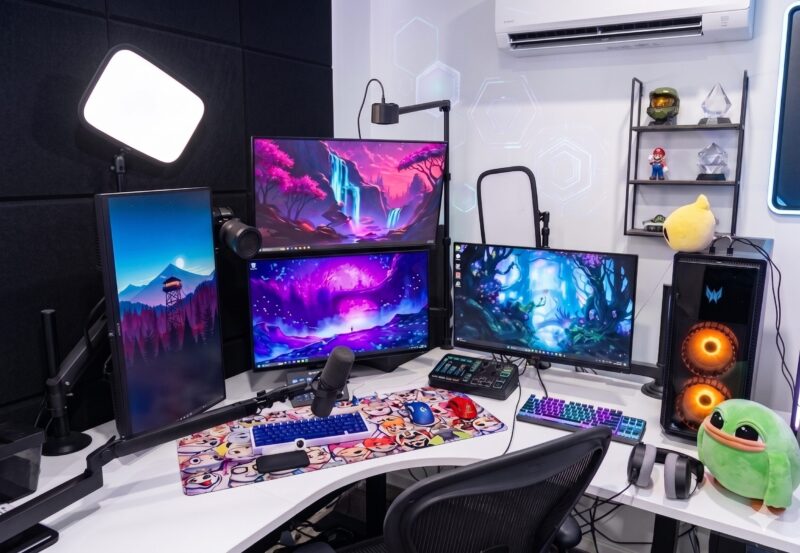
AussieAntics is rocking a massive four-monitor setup in his studio, which might look like overkill at first, but this can actually be a productivity dream for someone in his line of work. For example, streamers usually have a vertical monitor, like the one he has on the left, to smoothly read through massive, fast-moving Twitch chats and scroll through live tournament brackets without missing the details.
The stacked dual monitors right in front of his setup look perfect for keeping his primary game feed and his own broadcast software centered, while the landscape screen on the far right can give a dedicated space for secondary match feeds, Discord channels, or social media updates. Essentially, a monitor matrix like this lets you keep your eyes on four different things at once, eliminating the need to constantly Alt-Tab back and forth when things get chaotic live on stream.
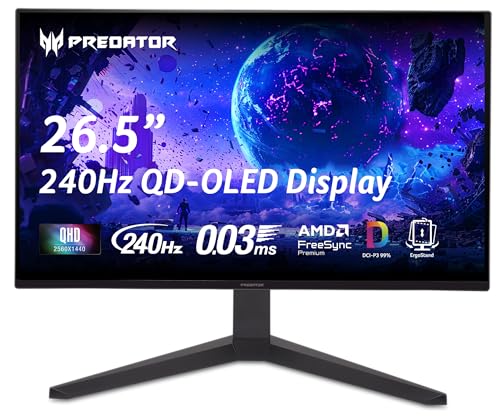
- • 240Hz Refresh Rate
- • 0.03ms Response Time
- • 2560x1440 QD-OLED Panel
This high-refresh speed monitor is the primary screen situated on AussieAntics’ desk setup. A monitor like this can ensure when he jumps straight into Fortnite, his visuals are blur-free and lag-free during intense matches.
- Primary Gaming Monitor: Acer Predator X27U OLED. This is his main high-refresh panel (26.5-inch, 240Hz, 0.03ms response time) located on the right. He relies on this display because it ensures frame rates never dip during chaotic endgames.
- The Stacked & Vertical Displays: His secondary screens consist of standard 27-inch multi-tasking panels. He utilizes the left display in vertical portrait mode to monitor long Twitch chat scrolls and live bracket data simultaneously.
Audio & Studio Equipment

- • Cardioid Polar Pattern
- • Bass Rolloff & Mid-Range Controls
- • Electromagnetic Hum Shielding
As a professional commentator, capturing crisp audio is crucial, making the SM7B the focal point of AussieAntics’ desk. It effortlessly delivers his signature deep, broadcasting tone while blocking out the hum of his surrounding equipment.

- • 4-Channel Motorized Sliders
- • Premium Low-Noise Midas Preamp
- • Built-In Hardware Vocal FX & Sampler
This desktop mixer sits flat directly underneath his center monitors, acting as AussieAntics’ central control hub. It allows him to instantly slide the physical faders to balance gameplay, Discord, and his microphone levels while on the air.
- Microphone: Shure SM7B. The dynamic cardioid broadcast microphone is mounted to a flexible, black desk-clamped boom arm.
- Broadcast Mixer: TC Helicon GoXLR. Positioned directly flat underneath his central display matrix to independently adjust game audio, discord volume, and background music on the fly.
- Headphones: Beyerdynamic DT 900 Pro X. Premium open-back studio headphones, which can be seen resting on the right side of his white desk next to the Peepo plushie.
- Desk Mat: ArcaLoot Custom Desk Mat. A full-length hydrophobic gaming mat decorated with custom, hand-drawn Fortnite and streaming emote collage graphics.
For more information on mics, make sure to check out our best microphones for podcasters review.
Keyboards, Mice, & Aesthetics
- Primary Keyboard: Mode Envoy (65% Layout). This custom-built mechanical keyboard sits centrally on his main desk mat. It was specifically built for him featuring an E-White case, custom carbon fiber plate, and PBTFans Klein Blue keycaps.
- Secondary Keyboard: HyperX Alloy Origins Core TKL. This secondary keyboard sits off to the right side of the desk, fitted with tactile HyperX Aqua switches, which he uses to input auxiliary hotkeys and track secondary streams.
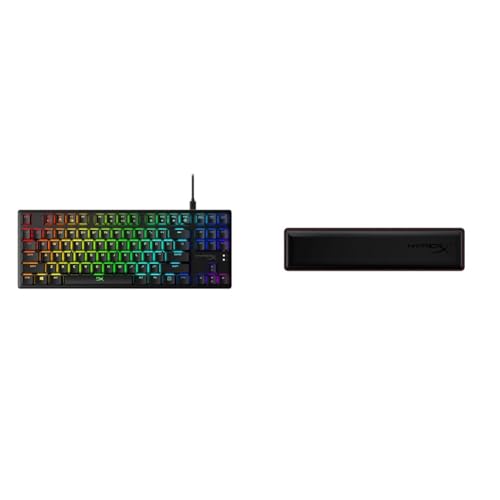
- • Tenkeyless Form Factor
- • HyperX Linear Red Switches
- • Aircraft-Grade Aluminum Body
AussieAntics keeps this tenkeyless keyboard resting on the right side of his curved desk to input hotkeys. The smooth linear red switches allow him to quickly manage background processes and auxiliary commands without touching his main layout.

- • 64g Ultra-Lightweight Design
- • Focus Pro 30K Optical Sensor
- • Gen-3 Optical Mouse Switches
When it comes to competitive cross-hair tracking, this ergonomic wireless pointer is AussieAntics’ primary choice. Its featherlight 64-gram weight prevents hand fatigue during marathon casting schedules.
- Primary Mouse: Razer DeathAdder V3 Pro Wireless. This ultra-lightweight ergonomic mouse is his primary input device for fluid cross-hair tracking during competitive sessions.
- Secondary Mouse: HyperX Pulsefire Haste Wireless. The solid blue mouse seen on the center desk mat acts as his auxiliary stream navigation mouse.
Where it all started for AussieAntics
Shaun’s journey to the top of the Fortnite world wasn’t an overnight miracle; it was built on long, grueling hours of work. Starting out streaming from a basic room back in Australia, he spent years grinding the competitive scene from the ground up. AussieAntics officially kicked off his streaming journey around October in 2018. Before diving into content creation full-time, he actually ran his own personal training business for four years. For a little over a year, he pulled double duty, grinding out gym sessions with clients during the day and building up his gaming audience at night.
By early 2020, his channel had gained enough momentum for him to take the leap of faith into full-time streaming. He gave himself a short window to see if it would work out, and clearly, that test paid off massively for him! His real breakthrough came from his relentless coverage of tournament watch parties, where his analytical mind and unique perspective caught the attention of the wider community. Eventually, his talent took him all over North America and Canada to cover massive live events, before he finally returned home to Australia as a signed creator for Dignitas to setup his ultimate workspace.
What truly makes AussieAntics stand out in a sea of generic streamers is his unparalleled analytical approach to esports commentary. While many creators focus purely on hit clips and pub-stomping gameplay, Shaun is essentially the sports broadcaster of Fortnite. He reads stacked endgames like a playbook, breaking down professional rotations, building strategies, and storm surge math in a way that is super easy for casual viewers to understand. His fun way of turning a chaotic 100-player battle royale lobby into an elite, structured sporting event has made him the go to watch party host for the competitive community.
Why his setup
When you look at the entirety of his office, it’s clear that AussieAntics has constructed a blueprint layout for his specific line of work. A high-end dual-PC setup paired with a multi-display matrix is essentially the standard for modern, top-tier broadcasters who need to monitor multiple live feeds, Discord chats, and event stats simultaneously without experiencing a single frame of lag.
However, what really gives his studio its unique charm is his famous fishtank, a signature background piece that infuses the entire space with a cool, natural vibe. When streamers add a living, breathing element like a beautifully lit aquarium to their room, it instantly breaks up the stark look of cold technology. It gives his stream a distinct ambient appeal that feels alive and organic, making sure that his corner of the internet stands out visually as much as his commentary.

Combining a BSc in Computing and Business with a passion for digital productivity, Eamon A. has spent the last three years reviewing the latest tech innovations. From high-performance laptops to essential home office accessories, his in-depth comparisons focus on design and functionality, ensuring readers find the perfect tools for their setup.
Last update on 2026-07-09 / Affiliate links / Images from Amazon Product Advertising API