📢 Disclosure: Some links on this page are affiliate links. As an Amazon Associate, I earn from qualifying purchases at no extra cost to you. Thanks for your support.
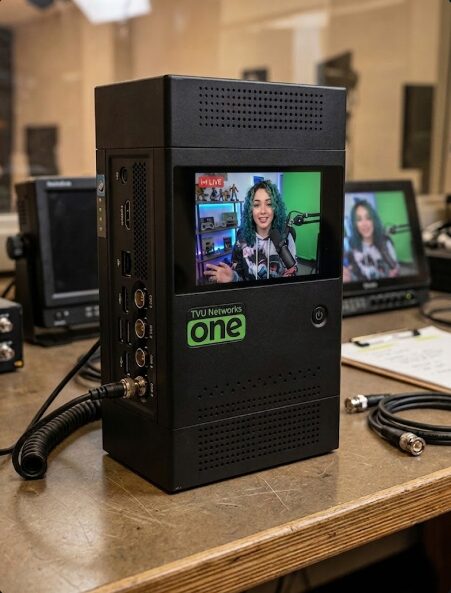
If you’ve ever watched a live stream and spent half the time looking at a buffering wheel, you know exactly why the pros are switching to gear like the TVU One. It’s not just a fancy accessory for the sake of looking technical; it’s a total game-changer for anyone who wants to broadcast from the middle of nowhere without the stream cutting out every five minutes. While we’ve looked at IShowSpeed’s gaming setup before, his mobile rig is a completely different ball game when it comes to portable streaming.
Back in the day when things were simpler, even the top streamers who were streaming from the street were stuck with whatever their phone’s data could handle. But if they walked into a basement or a crowded area, chances were that the stream was basically toast. But now, creators are stepping up their game and using the same kind of stuff that big news networks use to report live from disaster zones or remote locations. This shift is all about one thing, and that’s to create a more reliable setup. And that makes sense considering the IRL streaming industry is making some people big bucks now.
The Magic of Bonding
The TVU One is basically a powerhouse in a box, that looks like a large battery pack and handles something called cellular bonding. Instead of putting all your eggs in one basket with a single SIM card or a spotty Wi-Fi connection, this device lets you use a bunch of different internet sources at the exact same time. It’s got multiple modems inside that can talk to different cell towers from different companies all at once.
It takes your video signal, often coming from a high-quality camera like the DJI Osmo Pocket 3, and then breaks it into tiny little pieces, and sends those pieces through every available path. Then, it puts them back together on the other side so your viewers see a smooth, high-def video. It’s the ultimate safety net because if one tower gets crowded or you lose signal on one carrier, the other ones just pick up the slack without the audience ever noticing a hitch.
Speed’s 18 SIM Card Strategy
They showed this setup in his IRL stream during IShowSpeed’s massive tour of Africa, and it was an awesome example of this high-end gear in action. For a trip as ambitious as exploring a whole continent for 30 days, you can’t just rely on a standard hotspot. A team like Speed’s would need to make sure that, whether they were in a busy city or driving through a remote area where they might even need a language translation device to get around, the stream stayed live. That’s why they had such a heavy-duty rig set up in their home base. It wasn’t just about having the gear, though; it was about the insane amount of prep work that went into making sure all those connections actually worked together.
One of the most intense parts of this setup was the painstaking task of managing 18 different SIM cards. You might wonder why anyone would need 18 cards, but when you’re moving across different countries and regions, carrier coverage changes constantly. To make this work, a member of the team had to take each individual SIM, pop it into a Samsung phone, and manually unlock it by entering its PIN. This is a huge deal because if a SIM card is PIN-locked, the TVU One modems can’t just grab the signal and go. By pre-unlocking every single card, they ensured that the second a card was plugged into the encoder, it would immediately start providing data to the stream.
You can see them doing this in practice on the stream – I Spent 30 Days Exploring All Of Africa! It’s at about the 3:08 minute mark, so pretty early on.
Satellite Backups and Powering the Rig
They also showed a flat, silver panel in his stream that’s actually a Starlink dish. This is another layer of their fail-proof internet strategy. While the TVU One handles the cellular side of things, Starlink provides high-speed satellite internet. By plugging the Starlink feed directly into the TVU transmitter, the team most likely created a hybrid connection.
If they were in a spot where the cell towers were nonexistent, but they had a clear view of the sky, Starlink saved the day. Keeping all this gear running for hours on end is a massive drain on power, which is why having one of the best power banks on hand is super necessary for a mobile crew. It’s the best way to ensure the hardware doesn’t die right as the stream is getting good.
Other ways the TVU One and similar tech are used
Streamers aren’t the only ones using this tech. In fact, cellular bonding has basically taken over the news world, powering roughly 80% of regional TV news coverage in the U.S. and mostly replacing those huge satellite trucks you used to see. It’s also a huge deal for live sports and concerts, where thousands of people in a stadium would normally crush any single cell tower’s signal. Because these boxes can handle multiple connections, they can stay live even when everyone else’s phone stops working.
You’ll also find this gear being used for mission-critical stuff like emergency services. Ambulances and police vehicles use cellular bonding to keep a solid data link while they’re flying through different coverage zones, making sure they don’t lose contact for a second. It’s even used in high-tech fields like remote robotics and drone operation, where surgeons or engineers need a near-instant video feed to control machinery from the other side of the world. So, as you can see, these devices can cover a wide range of activities from covering an election, or helping a search-and-rescue team, to creating an IRL stream with YouTube influncers like Ishowspeed with the TVU One, this type of tech is all about keeping that connection super strong.
Other Pro Choices
While the TVU One is an awesome piece of tech, it’s not the only way streamers are staying connected these days. There are a few other options out there depending on how much money and technical know-how you’ve got. We’ve seen similar high-stakes setups when looking at Sneako’s streaming setup, where staying live is the top priority.
You’ve probably heard of LiveU, which is the biggest rival to TVU and works on the same basic principle of cellular bonding. Then there’s Teradek, which is often the go-to for film crews who need super high-quality video. If you’re on a tighter budget, some people even build their own DIY versions using a Raspberry Pi and some USB modems, though that’s way more likely to give you a headache if something goes wrong mid-stream.
Setting up your own rig
If you’re looking to get into IRL streaming, you don’t necessarily need the massive budget Speed had in Africa, but the principles are exactly the same. First, you’ve got to pick your bonding “brain.” You can go pro with a TVU One or a LiveU Solo, or you can go the DIY route with a Raspberry Pi running Belabox. If you’re just starting out, you can even use software like Speedify on a laptop or smartphone to bond your phone’s 5G with a local Wi-Fi. The most important part of the setup is the SIM card prep. You’ll want at least two or three cards from different carriers to make sure you’ve always got a signal. Just like Speed’s team, you’ve got to pop each one into a phone first to disable the PIN lock in the settings so your encoder can talk to the network immediately.
Once the internet is sorted, you need to plug in a solid camera. Most bonding boxes use an HDMI input, so you’ll want a decent camera with a gimbal for walking around, I think the DJI Osmo Pocket 3 is an amazing choice for this because its quality is great for the price, and its built-in gimbal is perfect for walking with. If you plan on going really remote, adding a Starlink dish as a backup is a lifesaver; you just plug it into the Ethernet port of your bonding unit. Finally, don’t forget the power. Between the camera and the encoder, a powerbank helps to keep everything juiced up. Always do a test run in your neighborhood first to check your latency, which usually, a 2 to 5 second delay is the sweet spot for talking to your chat without the video lagging.
The New Standard
At the end of the day, using this kind of tech shows just how much the industry is changing. We’re moving away from simple vlogging and into the era of full-scale mobile broadcasting. It takes a lot of work, a lot of SIM cards, and some pretty expensive black boxes, but the result is that we get to follow along on these incredible journeys in real-time without the video ever cutting out. It’s a lot of effort for the behind-the-scenes crew, but for the millions of people watching, that seamless experience is what makes these global tours so legendary.
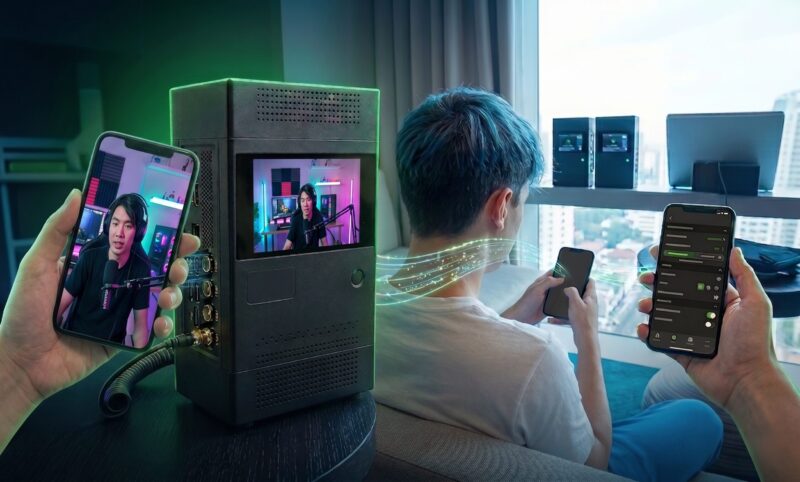
IShowSpeed has relied on this specific TVU equipment for some of his most ambitious live events, including his 35-day US cross-country tour and his Africa tour as mentioned. His team uses these units because they can aggregate up to 12 data connections simultaneously, including 5G, 4G LTE, Starlink, and Wi-Fi, to maintain a stable, broadcast-quality stream in environments where a single phone would fail. They mentioned 18 connections on the stream so that’s probably why they had 2 of these units. Which goes to show the effort needed to maintain IRL livestreams at that level.
Thanks for reading our article on how streamers like IShowSpeeds are getting such a stable internet connection using tech like the TVU One. Make sure to check out our similar articles next!

Combining a BSc in Computing and Business with a passion for digital productivity, Eamon A. has spent the last three years reviewing the latest tech innovations. From high-performance laptops to essential home office accessories, his in-depth comparisons focus on design and functionality, ensuring readers find the perfect tools for their setup.