📢 Disclosure: Some links on this page are affiliate links. As an Amazon Associate, I earn from qualifying purchases at no extra cost to you. Thanks for your support.
Are you looking for web camera reviews to help you decide which upgrade is actually worth it? Whether you are trying to look more professional on Zoom or starting your journey as a content creator, picking the right gear can be tricky, especially with web cams. So, in this article, I’ve cut through the marketing noise to break down the top rated web cameras for different budgets and use case, helping you decide exactly which one if best for you.
- Editor's Choice: Acer 4K Webcam for PC/Mac "A massive sensor and premium build make this a great value 4K webcam."
- Best Option For Laptops: Insta360 Link 2 "The built-in gimbal keeps you perfectly framed even if you move around your desk."
- Best Budget Pick: Microsoft LifeCam HD-3000 "Affordable HD Webcam, made by well know brand, and easy to use."
- Premium Pick: OBSBOT Tiny 2 AI-Powered 4K Webcam "The smartest webcam on the market. It physically moves to track you and features a massive sensor for DSLR-like quality."
- Best Value: Anker PowerConf C200 2K Webcam "The perfect balance of price and performance. It delivers sharper-than-1080p video and excellent noise cancellation for home offices."
Read full list below.
So, let’s jump straight into our list:
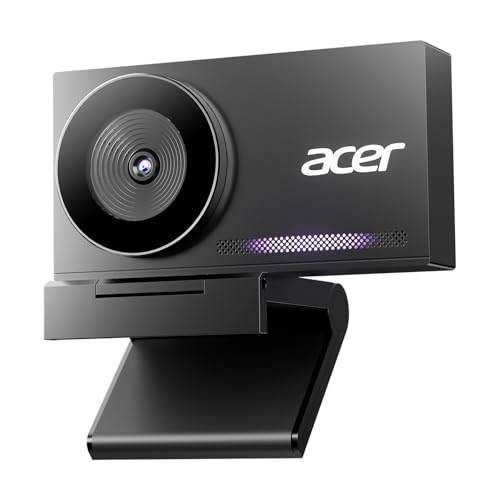
- • Resolution: 4K UHD
- • Sensor: Sony 1/2 inch CMOS
- • Build: All-Metal Unibody
The Acer 4K Webcam is an absolute steal for streaming and professional calls. It features a massive Sony 1/2″ CMOS sensor,much larger than typical webcams, which delivers superior low-light performance and natural background blur. With an all-metal body and PDAF autofocus, it feels far more premium than its price suggests, making it the perfect upgrade for anyone wanting 4K clarity on a budget.
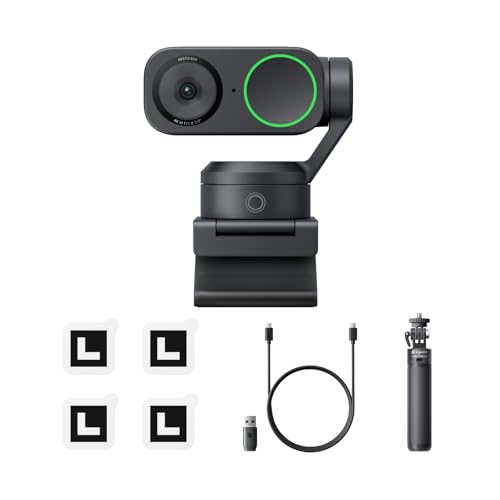
The Insta360 Link 2 is perfect for laptop users who take calls away from a desk. Its built-in gimbal keeps the image level even when you shift positions. It uses a motorized gimbal to physically track you as you move, giving you a level of freedom that built-in lenses just can’t match. Plus, with its massive 1/2-inch sensor, the image quality is really good, allowing it to deliver sharp 4K video and natural background blur that makes even dim home offices look professional.
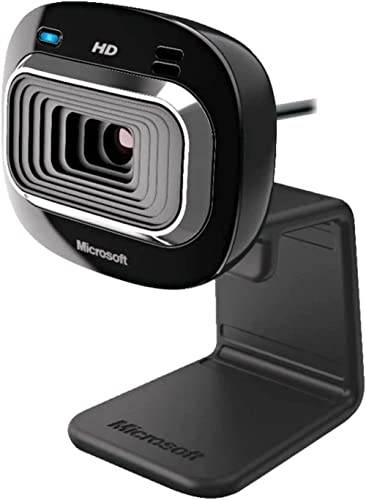
The Microsoft LifeCam HD-3000 is a reliable workhorse for everyday video calls, and it’s on that i’ve personally used for over 8 years. It offers True 720p HD video and a built-in noise-canceling microphone that helps reduce background noise. While it lacks the 1080p or 4K sharpness of modern premium cams, its universal attachment base makes it easy to mount on any laptop or monitor, making it an excellent value choice for students or business use.

- • Resolution: 4K 60fps
- • Sensor: 1/1.5'' CMOS
- • Tracking: AI 2-Axis Gimbal
The OBSBOT Tiny 2 is more than a webcam, it’s like having a personal cameraman on your desk with the features it packs. It has a massive 1/1.5″ CMOS sensor, the largest in its class, which delivers incredible low-light performance and natural background blur. The real magic is the 2-axis gimbal and deep learning AI, which physically tracks your movement around the room. You can even use Voice and Gesture Control to zoom in or put the camera to sleep without touching a thing.

- • Resolution: 2K Ultra-Clear
- • Field of View: Adjustable (65°
- • 78°
- • 95°)
- • Mics: Dual Stereo with AI Noise Cancellation
The Anker PowerConf C200 is arguably one of the best “bang for your buck” type of webcams on the market. For the same price as older 1080p cameras, you get sharp 2K video and a highly customizable field of view, perfect for tightening the frame to hide a messy room behind you. It also features dual AI noise-canceling microphones that filter out background noise, making it an excellent all-in-one choice for remote workers who don’t want to wear a headset.
Why your laptop webcam could be holding you back
If you’ve ever wondered why you look grainy or washed out on video calls even when your room is well-lit, the blame likely lies with your laptop’s built-in camera. To keep laptops razor-thin, manufacturers are forced to use tiny sensors that struggle to capture enough light, resulting in “noise” and poor color accuracy. Worse still is the fixed positioning; laptop lenses are often stuck at unflattering angles, either looking up your nose from a low bezel or capturing too much ceiling from the top, giving you zero control over how you are framed. Relying on these integrated units often means sacrificing professional presentation for convenience.
When I first started taking calls online, I unknowingly relied on my laptop’s built-in camera, thinking it was the norm. But I quickly realized it wasn’t the way forward. While it is definitely the convenient option, it can often look like you’re using a flip phone from 2005. Unless you have perfect studio lighting, the quality on most standard built-in cams becomes a grainy, unclear mess.
What High-End Models Offer
Moving up to premium dedicated webcams like the Insta360 Link 2 or our Premium Pick, the OBSBOT Tiny 2, completely changes the game. Because they do more than the standard webcam, with the new AI tech, they become smart assistants. They’re able to utilize much larger sensors, often rivaling dedicated point-and-shoot cameras, to deliver crisp, broadcast-quality 4K video with genuine depth of field.
But the real magic is in the AI. These cameras feature motorized gimbals that physically rotate to track you as you move around the room, ensuring you are always center stage. With features like gesture control, where a simple hand wave can zoom in or reset your frame, and specialized modes for whiteboards or desk views. These features become really useful tools for content creators and professionals who need to command a room virtually without constantly worrying about angles and lighting.
What if you dont need all the fancy tech?
Basic external webcams can still offer a much needed improvement from your built-in cam. You don’t always need to spend hundreds of dollars to get a significant upgrade, however. Webcams, such as the veteran Microsoft LifeCam HD-3000, serve a vital role for users who simply need reliability. While they may cap out at 720p or 1080p, they offer one massive advantage over your laptop: flexibility. You can mount them on a separate stand or monitor to get perfectly eye-level framing, and their dedicated microphones often do a far better job of canceling out background noise. For everyday Zoom calls or family chats, these budget-friendly workhorses solve the biggest ergonomic and lighting headaches without having to fork out too much.
I’ve personally relied on the Microsoft LifeCam HD-3000 for over eight years. While it isn’t a groundbreaking piece of tech, it represents a solid, reliable upgrade from a standard built-in lens. The image is noticeably less grainy, and the flexible mount sits securely on any laptop or monitor, providing a much more natural angle for calls.
The only area where it shows its age is lighting control. If your room’s lighting is good and consistent, it performs perfectly. However, if you work near a window, you might find that shifting daylight causes the auto-exposure to struggle. You might find that with lower-end web cams, you may spend more time adjusting the lighting controls manually in Windows, Camera Device Settings. Especially if you work alot in a room that gets a lot of natural light. But for the price, I think it’s worth it. Especially if you’re just looking to upgrade from a built-in laptop webcam.
Overall
Ultimately, finding the right webcam comes down to how you want to present yourself online. If you are just jumping on the occasional family call or a quick team catch-up, you really don’t need to overcomplicate it. As I’ve found with the Microsoft HD-3000, a reliable budget workhorse is going to be a massive improvement over your laptop’s built-in lens without costing too much. It’s proof that you don’t need to spend big to stop looking like a grainy blur.
However, if you are creating content or leading high-stakes client meetings, investing in AI-powered gear like the OBSBOT Tiny 2 or Insta360 Link 2 is a total game-changer. The ability to move around freely while staying in focus, combined with crystal clear 4K quality, gives you a level of professionalism that’s hard to beat. But whichever route you take, moving away from that tiny sensor above your laptop screen is definitely the right move.
Make sure to check out our full list of top rated web camera options above and read our web camera reviews to help you find the right one. Thanks for reading, oh, and if you’re on the look out for a new laptop, make sure to try our laptop finder quiz for a free and quick personalized recommendations list. Thanks for reading!

Combining a BSc in Computing and Business with a passion for digital productivity, Eamon A. has spent the last three years reviewing the latest tech innovations. From high-performance laptops to essential home office accessories, his in-depth comparisons focus on design and functionality, ensuring readers find the perfect tools for their setup.
Last update on 2026-06-12 / Affiliate links / Images from Amazon Product Advertising API