📢 Disclosure: Some links on this page are affiliate links. As an Amazon Associate, I earn from qualifying purchases at no extra cost to you. Thanks for your support.
One thing that can really help when you’re shopping for tech online is a good research tool. The right one can give you the insight you need to make a confident decision. There are plenty of problems that can pop up when you skip the research stage, especially when you’re dealing with higher-priced products. And with how fast the tech world moves today, it’s harder than ever to keep up. New phones, laptops, GPUs, and gadgets hit the market constantly, and a basic spec sheet rarely tells the full story.
That’s why reliable tech research tools matter. They save time, reveal real-world performance data, and let you compare devices side-by-side before you spend a cent. I’ve used these tools myself and made sure each one is current, trustworthy, and genuinely helpful for real buyers.
Before we dive into the list, here’s a quick look at the criteria used to choose them.
How We Chose These Tools
To make sure this list actually helps you, each tool had to meet specific criteria:
- Accuracy of data: Specs, benchmarks, and comparisons must come from reliable sources.
- Update frequency: Tools that stay current with new 2026 releases ranked higher.
- Ease of use: Clean layouts, fast search, and simple comparison features.
- Relevance to tech buyers: Tools must meaningfully help with real purchase decisions.
- Comparison features: Side-by-side charts, benchmarks, rankings, or spec tables.
- Extra filters: GPU, CPU, laptop specs, performance scores, battery estimates, or compatibility options.
Of course, AI platforms like chatGPT, and Gemini can do an amazing job to answer questions about tech products, but it can super helpful to have data presented in more convenient ways so you can really see the bigger picture. Each tool earned its spot based on usefulness and reliabilit, no sponsorships, no paid placements. So, now that we’ve covered the review criteria, let’s jump straight into our list in no particular order.
1. VR-Compare
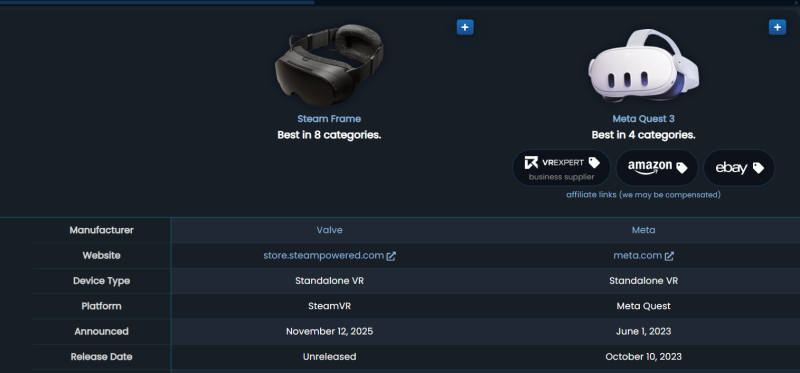
A dedicated VR headset comparison tool built specifically for evaluating VR and AR headsets. It lets you compare FOV, display type, panel resolution, refresh rate, optics, tracking systems, and other headset-specific hardware details that general tech comparison sites don’t cover.
Best For:
People comparing VR headsets or smart glasses and want detailed, hardware-level differences.
Standout Feature:
Ultra-specific comparison tables showing VR-only specs like clarity, lens type, FOV, and tracking accuracy, the type of data you won’t find on general tech sites.
Why It’s Useful:
VR-Compare breaks down the real differences between major VR headsets and the newer wave of AR/smart glasses. It simplifies what matters most for buyers: visual clarity, comfort, tracking, lenses, and display performance.
Our take:
What I like most is how quickly they update listings. For example, the Steam Frame VR was added after just being announced. Being able to instantly compare it side-by-side with existing headsets makes the buying process far easier and more informed.
Pros:
- Very detailed VR-specific data
- Updated frequently with new releases
- Clean and simple comparison layouts
Cons:
- Focused only on VR/AR devices
Ideal user:
Anyone deciding between multiple VR headsets or smart glasses and wants a clear, objective breakdown.
2. GSMArena
A well-known and highly trusted mobile device specification database with in-depth hardware information and powerful comparison tools. It covers smartphones, tablets, and other compact mobile devices with unmatched accuracy.
Best For:
Anyone researching phones, tablets, or handheld smart devices.
Standout Feature:
Legendary spec accuracy paired with massive historical device data and side-by-side comparison tables.
Why It’s Useful:
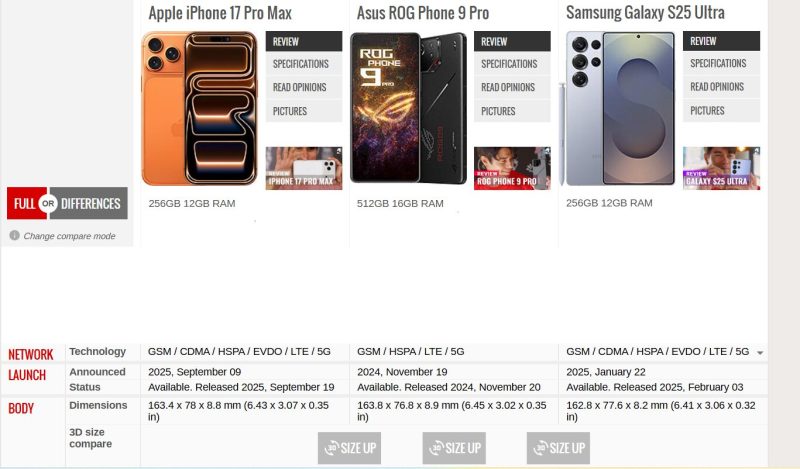
GSMArena helps buyers instantly understand the real hardware differences between devices, chipset performance, camera setups, battery capacity, charging speeds, display quality, and more. It removes all the guesswork from choosing between similar models.
Key thoughts:
When it comes to phone comparisons, GSMArena is still one of the cleanest and easiest tools to use. You can compare up to three devices at once with a complete spec breakdown displayed in a clear, readable format. They add new devices extremely quickly, which makes them a reliable go-to source. Their newer “SizeUp” tool is especially helpful, it lets you see devices side-by-side visually in a 360 degree format, so you get a real sense of the design and physical size differences.
Pros:
- Extremely accurate and trustworthy data
- Massive library of new and old devices
- Excellent comparison tools
Cons:
- Focused mainly on mobile devices
Ideal User:
Smartphone shoppers who want accurate, detailed specs to make an informed choice.
3. Versus.com
A broad comparison engine covering smartphones, CPUs, GPUs, cameras, smart devices, and more. Versus is designed for quick, side-by-side comparisons without requiring deep technical knowledge.
Best For:
Fast, simple comparisons across multiple tech categories.
Standout Feature:
Score-based comparisons that clearly highlight the “winner” in areas like performance, battery life, display, and value.
Why It’s Useful:
Versus breaks down complex specs into easy-to-understand summaries, making it ideal for buyers who want a quick, high-level sense of which device performs better.

Key findings:
What I really like about Versus.com is the visual performance chart. It gives you an instant snapshot of how different aspects of a device perform, from CPU strength to battery life to display quality, and then lets you compare that visually with other devices. This makes performance gaps much easier to understand than reading raw spec lists. The same applies to GPUs: their comparison charts help highlight strengths and weaknesses that written specs alone sometimes hide. It’s a great tool for quickly identifying which device pulls ahead before moving on to deeper research.
Pros:
- Covers a broad range of device categories
- Great for general-purpose comparisons
- Very useful visual performance charts
Cons:
- Some categories rely on simplified or inconsistent data
Ideal User:
Buyers who want quick, high-level visual comparisons without technical overload.
4. Technical.City (Video Card Comparison Tool)
A cross-generation GPU and CPU comparison tool that breaks down raw performance, architecture differences, and real-world benchmarks in a clear, digestible format.
Best For:
Handheld PC buyers, laptop shoppers, and PC users comparing raw GPU or CPU performance.
Standout Feature:
Straightforward performance summaries expressed in plain language, including percentage differences and gaming/productivity suitability.
Why It’s Useful:
Technical.City provides quick, practical answers like “X% faster in gaming”, which is ideal for non-experts who just want to know which component performs better without digging into complex benchmark data.

Our Take:
For GPU comparisons specifically, this is one of my favorite quick-reference tools. It’s simple, clean, and doesn’t overwhelm you with endless categories or irrelevant data. The performance results are displayed in a clear percentage format, and the visual chart makes it easy to see which GPU comes out ahead. If you’re trying to understand the gap between something like an RTX 3050 and an RTX 3060 without digging into deep benchmark sites, this tool gives you a fast, easy answer. It’s especially handy for mid-range laptop or handheld PC buyers where raw spec sheets don’t always tell the full story.
Pros:
- Very easy to understand
- Useful for PC buyers
- Good GPU summaries
Cons:
- Not the deepest benchmark site
- Performance estimates may differ in real-world scenarios depending on system hardware
Ideal User:
Casual buyers comparing hardware power and wanting a quick, clear verdict.
5. ComparisonTables: Handheld Gaming PC Table
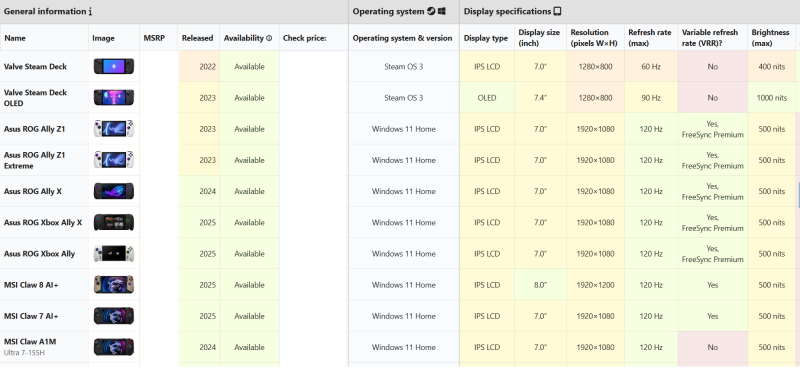
A dedicated handheld gaming PC comparison page that puts all the major Windows and Linux handhelds into one big interactive spec table. It lets you scan and compare things like display, CPU, GPU, RAM, storage, ports, battery, size, and more in one view.
Best For: People comparing Steam Deck, ROG Ally, MSI Claw, Lenovo Legion Go, Ayaneo, and other handheld gaming PCs side by side.
Standout Feature: A huge, filterable table with sortable columns and color-coded cells, plus an A/B side-by-side comparison tool for quickly checking two handhelds against each other.
Why It’s Useful: Handheld PCs are still a niche category, and most comparison tools either ignore them or only cover a couple of models. This page brings a wide range of handhelds together and lets you actually compare specs in detail instead of bouncing between multiple product pages. It’s especially useful if you’re trying to balance performance, battery life, and portability across different brands.
Our thoughts:
This is from a lesser-known site, but it’s a genuinely great tool for comparing handheld gaming consoles side by side. You don’t usually see dedicated tables for handheld PCs, and as more options come out, it’s really useful to see how they stack up in one place. I like how you can quickly sort and filter by things like display, battery, or storage to narrow down your options. The only downside is that the formatting can feel a bit dense, and I’d love to see more visual design comparisons, like clearer size/shape visuals or more prominent photos, to help buyers picture how each device actually looks and feels in the hand.
Pros:
- Dedicated comparison table for handheld gaming PCs
- Lots of useful filters and sortable columns
- Handy side-by-side comparison tool
Cons:
- Layout can feel a bit dense, especially on smaller screens
- Limited visual design/size comparison beyond basic images
Ideal User:
Handheld PC buyers who want a detailed, spec-focused overview of all the main options in one place.
6. Pangoly Laptop Comparison Tool
An underrated laptop comparison engine with clean, side-by-side spec tables that make it easy to compare different configurations of the same model or similar laptops.
Best For:
Comparing laptop specs quickly in a simple, no-nonsense layout.
Standout Feature:
Clearly shows configuration differences between models, RAM, storage, CPU, GPU, and screen variants, so you can see exactly what changes as you move between trims.
Why It’s Useful:
Laptop listings often look almost identical, and tiny spec changes can be buried in the fine print. Pangoly makes those differences obvious, which helps you avoid buying the wrong configuration or overpaying for a minor upgrade.
Key thoughts:
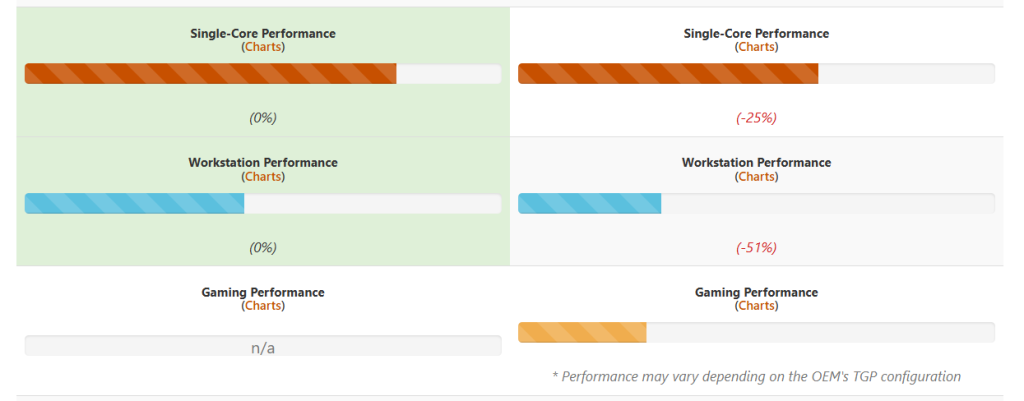
I really like the visual performance charts that show how a laptop stacks up in different usage categories. You can see at a glance how well a machine is likely to perform as a gaming laptop versus as a workstation, based on its hardware and components. It’s a great way to quickly figure out which laptop better suits your needs without digging through long spec sheets or multiple product pages.
Pros:
- Clear, easy-to-scan layout
- Lesser-known tool (a bit of a hidden gem)
- Very useful for comparing similar laptop models
Cons:
- Can lacks deep, enthusiast-level benchmark data
Ideal User:
Anyone comparing similar laptop models and configurations who wants a fast, clear way to spot the differences.
7. QuestStoreDB
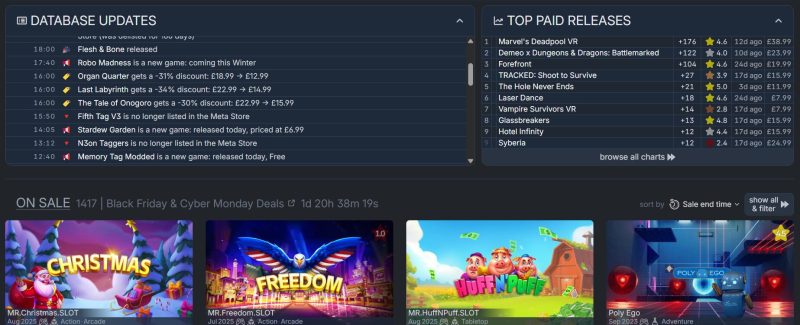
A VR app discovery tool that lists Quest-compatible games and apps, including free titles, discounts, and new releases. It’s designed as an alternative catalogue to the official Quest Store, with far more browsing flexibility.
Best For:
Quest VR users researching which apps or games to buy.
Standout Feature:
Free-app filtering and automatic deal tracking.
Why It’s Useful:
It gathers VR apps, prices, updates, and discounts all in one place, making it easier to browse and preventing you from missing good deals.
Key takes:
Although this site is specifically focused on VR titles, it does a great job presenting them in a clean, organised, catalogue-style layout. Compared to the official Quest Store, you can browse far more titles at once, and the filters make it much easier to find exactly what you’re looking for in our opinion. The list is updated frequently and includes thousands of free VR games and apps, which is especially useful for budget-conscious users or anyone exploring the VR library beyond the main storefront.
Pros:
- Great for VR discovery
- Includes free apps
- Good for budget shoppers
Cons:
- Only for the Quest ecosystem
- Relatively lesser-known site
Ideal User:
Quest owners looking for new apps, deals, and a more complete catalogue than the official store.
8. NanoReview
A comprehensive comparison site that covers smartphones, laptops, CPUs, and GPUs with detailed visual performance charts, benchmark data, and easy side-by-side comparisons.
Best For:
Users researching phones, laptops, or components and wanting deeper performance insights.
Standout Feature:
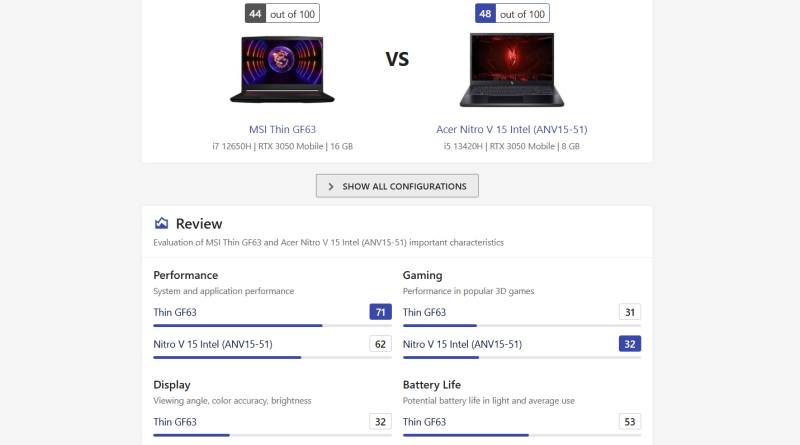
Multiple visual performance charts for each comparison, covering gaming, battery life, CPU/GPU workloads, efficiency, display quality, and more.
Why It’s Useful:
Unlike sites that provide a single score or a basic spec list, NanoReview breaks devices down across many categories. This makes it much easier to understand strengths, weaknesses, and real-world performance across different tasks.
Key findings:
I really like this site for phone research because it gives you not just one chart, but several different performance visuals. That makes it much easier to get an in-depth idea of how the phones you’re comparing actually perform across gaming, battery, display, and CPU/GPU-heavy tasks. It offers the same level of detail for laptops, GPUs, and CPUs as well, and you can drill down into the exact model and configuration. That’s why it’s also one of our favourite tools for comparing laptops, especially when you’re evaluating different trims and hardware setups.
Pros:
- Excellent multi-chart performance breakdowns
- Covers phones, laptops, CPUs, and GPUs
- Great for analysing different hardware configurations
Cons:
- Can feel a bit information-dense for casual users
- Some data varies depending on benchmark sources
Ideal User:
Tech buyers who want deep, visual performance insights across multiple categories, especially for smartphones and laptops.
BONUS TOOLS
9. ProductSearch.app
A visual price-comparison tool that lets you upload an image and instantly find where a product is being sold across multiple online retailers and marketplaces.
Best For:
Checking availability and pricing once you already know what device you want.
Standout Feature:
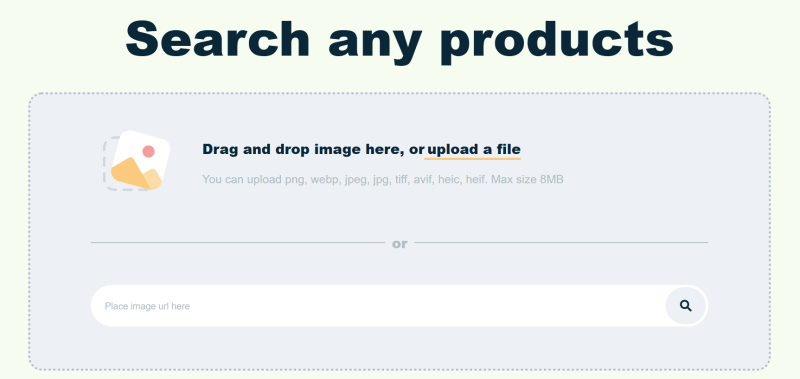
Upload an image → instantly see matching listings and compare prices across stores.
Why It’s Useful:
It saves time by scanning several marketplaces at once, helping you spot overpriced listings and find cheaper alternatives, especially if you’re open to used or refurbished items.
Key thoughts:
This is a really interesting tool because it lets you search for a product by simply uploading a photo. It’s especially handy when you’re shopping and want quick comparisons without typing long product names. It frequently pulls listings from sites like eBay, meaning you can find solid deals if you’re open to refurbished or second-hand options. It’s not built for deep research, but as a fast “find the best price” helper, it’s very effective.
Pros:
- Very fast
- Multi-store price search
- Image-based product detection
Cons:
- Can be hit-or-miss depending on the image used
- Dependent on store indexing
Ideal User:
People looking for a specific item or those who want quick, multi-store price comparisons.
10. CheckThatTech Laptop Finder Quiz
A quick and user-friendly quiz designed to help people choose a laptop based on their actual needs, such as performance, budget, portability, gaming, editing, and general use.
Best For:
Anyone unsure which laptop to pick and who wants personalised recommendations.
Standout Feature:
Instant matching based on preferences, no technical knowledge required.
Why It’s Useful:
Laptop shopping can be overwhelming, especially with so many similar models and configurations. This quiz simplifies the decision by narrowing options based on what matters most to the user. It’s a great starting point for beginners and a useful filter tool even for more tech-savvy buyers.

Our takes:
We think this is a genuinely helpful tool for people who aren’t sure what laptop to buy. It gives you a solid foundation by highlighting what to look for based on your usage and preferences. We update the available options regularly, and the quiz itself is very quick, you get matched with recommendations almost instantly.
Pros:
- Fast and easy to use
- Great for beginners
- Updated regularly with new laptop options
Cons:
- Works best as a starting point rather than a deep comparison tool
Ideal User:
Anyone feeling overwhelmed by laptop choices or looking for personalised, beginner-friendly recommendations.
Visit CheckThatTech Laptop Finder Quiz
Other notable mentions
PhoneArena
What It Is:
A smartphone comparison and review platform with detailed spec sheets and helpful ranking lists.
Best For:
People researching phone specs and real-world impressions.
YesChat.ai Alternative Product Finder
What It Is:
An AI-powered tool that finds similar or alternative products based on text, photos, or model numbers.
Best For:
Finding cheaper or better alternatives to a device you’re researching.
UserBenchmark GPU Compare
A straightforward performance comparison tool for GPUs, CPUs, and storage devices. It’s designed to give fast, easy-to-read results without requiring deep hardware knowledge.
Best For:
PC component comparisons and handheld gaming PC buyers checking GPU performance.
Disclaimer: Product images, titles, and descriptions may change. Information is for reference; see the live page for current details.
Conclusion
Good tech decisions come from good research, and the tools you use matter. Whether you’re comparing VR headsets, checking laptop configurations, exploring mobile options, or hunting for the best deal, these tools make the process faster, clearer, and more reliable. We handpicked each one to help you understand the products you’re considering and avoid mistakes, especially with expensive hardware.
Mixing these tools together gives you the big picture: performance, specs, value, alternatives, and pricing, all in one workflow. Use the ones that match your buying style, and you’ll make smarter, more confident choices every time.

Combining a BSc in Computing and Business with a passion for digital productivity, Eamon A. has spent the last three years reviewing the latest tech innovations. From high-performance laptops to essential home office accessories, his in-depth comparisons focus on design and functionality, ensuring readers find the perfect tools for their setup.