📢 Disclosure: Some links on this page are affiliate links. As an Amazon Associate, I earn from qualifying purchases at no extra cost to you. Thanks for your support.
If you’re someone who checks out tech reviews on YouTube, chances are you’ve seen Marques Brownlee’s videos. He’s better known as MKBHD, and for over the last decade or so, he’s become one of the top YouTube tech content creators, so it’s safe to say he knows a thing or two about choosing the right consumer gadgets. He’s spent years delivering crisp, high-production reviews that dictate what gadgets millions of people buy.
But while he spends his days critiquing the latest smartphones and electric vehicles, his personal workspace is definitely worth reviewing. It’s a powerhouse of a desk setup designed specifically to handle the daily workflow of heavy video editing, color grading, and content creation. We’re jumping into the core of his setup to check out the top of the range gear powering his daily routine. Much like how we’ve explored other creators transitioning their workspaces, such as PewDiePie’s Japan office setup or Sneako’s streaming setup, Marques prioritizes clean design and workflow efficiency above all else.
- Best Budget Workstation: Claiks Electric Standing Desk (63x24 Inches) "An affordable, motorized sit-stand desk that offers a spacious 5-foot layout and customizable height memory presets for everyday home offices."
- Premium Comfort Investment: Herman Miller Embody Ergonomic Office Chair "A premium, highly adjustable ergonomic task chair built to mirror the human spine for elite back support during long hours of sitting."
- MKBHD's Creative Screens: Apple Studio Display XDR (27-Inch 5K Retina) "A premium 5K professional monitor featuring mini-LED backlighting, 2000 nits peak brightness, and a reflection-defeating nano-texture finish tailored for Mac power users."
- The Sound Engineering Choice: Yamaha HS8 8-Inch Powered Studio Monitor "An iconic, high-performance nearfield reference monitor designed to deliver a brutally honest and flat audio mix without any artificial frequency boosting."
- The Sound-Signature Champion: Keebmonkey Wobkey Rainy75 Mechanical Keyboard "A premium, heavy-duty 75% mechanical keyboard famous for its incredibly deep marbly acoustics, full aluminum frame, and versatile wireless options."
Choosing the Best Sit-Stand Desk and Ergonomic Chair
The desk to a setup is the easiest way to make a first impression. It’s usually the biggest piece of furniture in the room and depending on which one you get, it can change the overall feel of your setup. The Desk that MKBHD’s using is the massive NextDesk Air Pro which is now branded under Xdesk, it’s an 8-foot by 3-foot motorized sit-stand and to many this might seem like overkill, but for a creator who needs the space for a long day’s content creative work, a desk this size can be a dream. What makes it unique is that the entire surface is made from a quarter-inch-thick solid sheet of aluminum. Even with a lot of heavy tech on it, it doesn’t bend or shake.
If you like the idea of a motorized workspace but don’t want to spend thousands on custom, solid metal, a budget alternative like the Claiks Electric Standing Desk gives that same push-button height adjustment feature. But keep in mind the tradeoffs in size. While its 63-inch width (just over 5 feet) is highly practical for everyday rooms, the top uses a multi-piece splice board rather than a single, seamless piece of aluminum. It also has a maximum weight capacity of 176 pounds, meaning while it’s great for a standard office dual-monitor setup, it won’t give you the same industrial, rock-solid feel under an ultra-heavy studio layout. That being said, it’s still an awesome height adjustable desk with a good amount of space.

- • 63 x 24 Inch Work Surface
- • 3 Memory Height Presets
- • 176 lbs Maximum Capacity
A good computer chair is something a lot of people can overlook, but if you’ve experienced body aches from hunching over too much, you’ll know a good erganomic chair is worth it. For his chair, Marques Brownlee has had the Herman Miller Embody for years. He considers it one of the best investments he’s ever made for back health, noting that the flexible support system has molded nicely to his back over time.
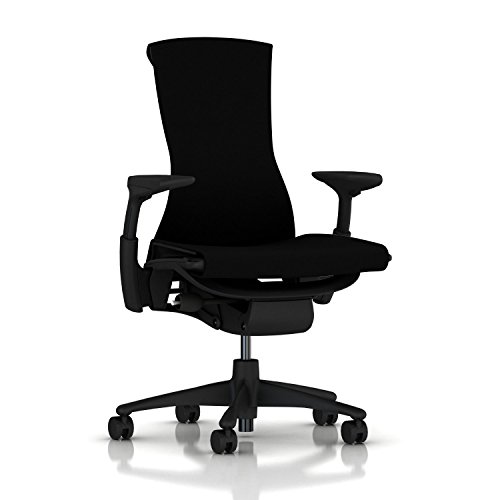
- • Pixelated Support Technology
- • Spine-Aligned Backfit Adjustment
- • Breathable Rhythm Fabric Layout
High-end chairs like this are a major investment, but there are also some good and more affordable ergonomic chairs out there that are worth checking out if the Herman Miller is not within budget. The Sihoo range is a great example, especially options like the Sihoo M18 or the Doro C300. They offer highly adjustable lumbar support, breathable mesh, and headrests that give you excellent daily back care without requiring a premium corporate budget.
Why MKBHD Uses a Mac Pro and Dual 6K Apple Monitors
When your daily job requires rendering massive files, you can’t rely on standard consumer tech. Marques runs an ecosystem that looks more like a Hollywood production suite than a home office. But it may surprise you that he’s still using the older gen Mac Pro M2 from 2020. While he doesn’t rate this the best, only 4 out of 10, he says for him it still does the job. However, I do suspect that he may upgrade soon based upon his review.
As mentioned, the Apple Mac Pro is packed with an M2 Ultra chip, and that usually comes with a 24-core CPU, a 76-core GPU, 192GB of RAM, and 8TB of storage. However, adding to that, MKBHD uses an internal 64TB OWC SSD expansion card just for live video backups. For the average user or casual video editor, this is way more power than you will need. A standard Mac Mini or Mac Studio usually handles everyday tasks, browsing, and casual editing just as smoothly without taking up massive desk space.
Driving his computer is a dual-monitor array of Apple Pro Display XDRs. These are 32-inch 6K reference monitors built strictly for high-end color accuracy across his team.
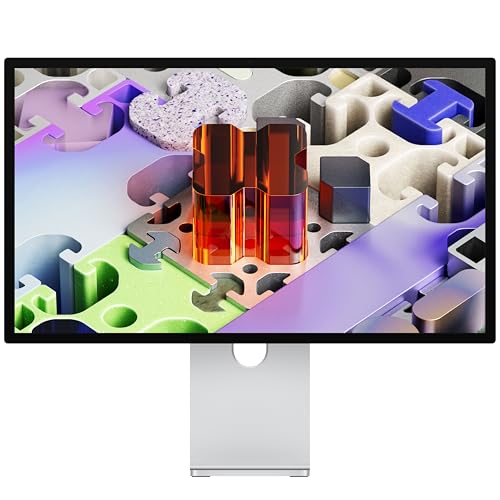
- • 27-Inch 5K Retina XDR Panel
- • 120Hz ProMotion Adaptive Sync
- • Anti-Reflective Nano-Texture Glass Finish
Together with the custom stands and nanotexture glass, this monitor setup can be extremely costly. If you want a similar look without the corporate price tag, something like the Kuycon G32P 32-inch 4K Monitor mimics Apple’s clean aesthetic and metal design for a much more realistic budget.
Studio Speakers and the Magic Trackpad Editing Workflow
Marques Brownlee’s sound setup is tailored entirely toward pristine reference audio and precise timeline scrubbing. He uses the Sennheiser HD 650 for his headphones, but for audio speakers, he rates a pair of matte-black Yamaha HS8 Active Studio Monitors quite highly. These reference speakers pump out deep sound all the way down to 40Hz, meaning he doesn’t need a separate subwoofer under his desk.

- • 8-Inch Cone Woofer & 1-Inch Dome Tweeter
- • 120W Total Bi-Amp Power Amplification
- • 38Hz - 30kHz Flat Frequency Response
As mentioned above, when he needs to isolate his audio, he uses open-back Sennheiser HD 650 headphones so he can hear his team talk in the studio without taking them off. For a smaller room or desk, the Yamaha HS5 speakers offer a similar clean audio profile in a smaller footprint. You can also swap the headphones for the Massdrop x Sennheiser HD 6XX, which use the same audio drivers for a much lower price.

- • Sturdy 6063 CNC Aluminum Alloy Build
- • Triple-Mode Connectivity (Wired/BT5.0/2.4G)
- • Five-Layer Internal Foam Dampening
His mouse and keyboard layout is pretty interesting. Marques uses a Wob Rainy75 Mechanical Keyboard to type, but pairs it with an Apple Magic Trackpad on the left and a Logitech MX Master 4 mouse on the right. He runs both at the same time so his left hand can zoom and slide across his video timelines while his right hand navigates normally. If you want that comfortable, multi-tasking mouse grip without paying a premium, the Keychron M6 Wireless Mouse offers a similar ergonomic shape and a side-scroll wheel that is great for office work.
Does a Premium Video Editing Setup Actually Save Time?
At the end of the day, Marques Brownlee’s workspace shows how a professional setup can be tailored directly to a specific workflow. He focuses heavily on functional choices that optimize his day-to-day video production.
While the price tags on his dual XDR displays and Mac Pro workstation are a massive investment, the layout makes a lot of sense for a high-volume creator. If you look at how other prominent creators scale their rooms, like we did in our AussieAntics streaming setup review or the breakdown of iShowSpeed’s gaming setup, the core lesson is always the same. By prioritizing large screen real estate, reliable hardware, and excellent ergonomic support, you build a space that simply keeps you comfortable, focused, and productive during long hours at the desk.
We hope this review of Marques Brownlee’s office setup helped you! Make sure to check out our similar setups and tech reviews next.

Combining a BSc in Computing and Business with a passion for digital productivity, Eamon A. has spent the last three years reviewing the latest tech innovations. From high-performance laptops to essential home office accessories, his in-depth comparisons focus on design and functionality, ensuring readers find the perfect tools for their setup.
Last update on 2026-06-09 / Affiliate links / Images from Amazon Product Advertising API